MiniMax H3 Max logoMiniMax H3 Max
Checking account status

MiniMax H3 Max Fast AI Video Generator

Create short H3 Max videos from text, images, or reference media, with generated audio. Choose the resolution, duration, and prompt settings, then check the credit cost before generating. This is an independent third-party service.

0/50000
Controls how the prompt is prepared before generation. Disabled keeps your wording, Balanced applies the default expansion, and Quality uses more detailed expansion.
15s
Failed or canceled task credits

If a generation fails, times out, or is canceled, wait until it reaches a final status, then check your balance and generation history. If the balance looks wrong, contact support with the task ID.

Production preview

MiniMax H3 Max

H3 Max Video Examples

Six video examples covering fashion, underwater exploration, paper craft, action sports, environmental transformation, and group dance. Open any card to see its recorded settings, video description, and practical review notes.

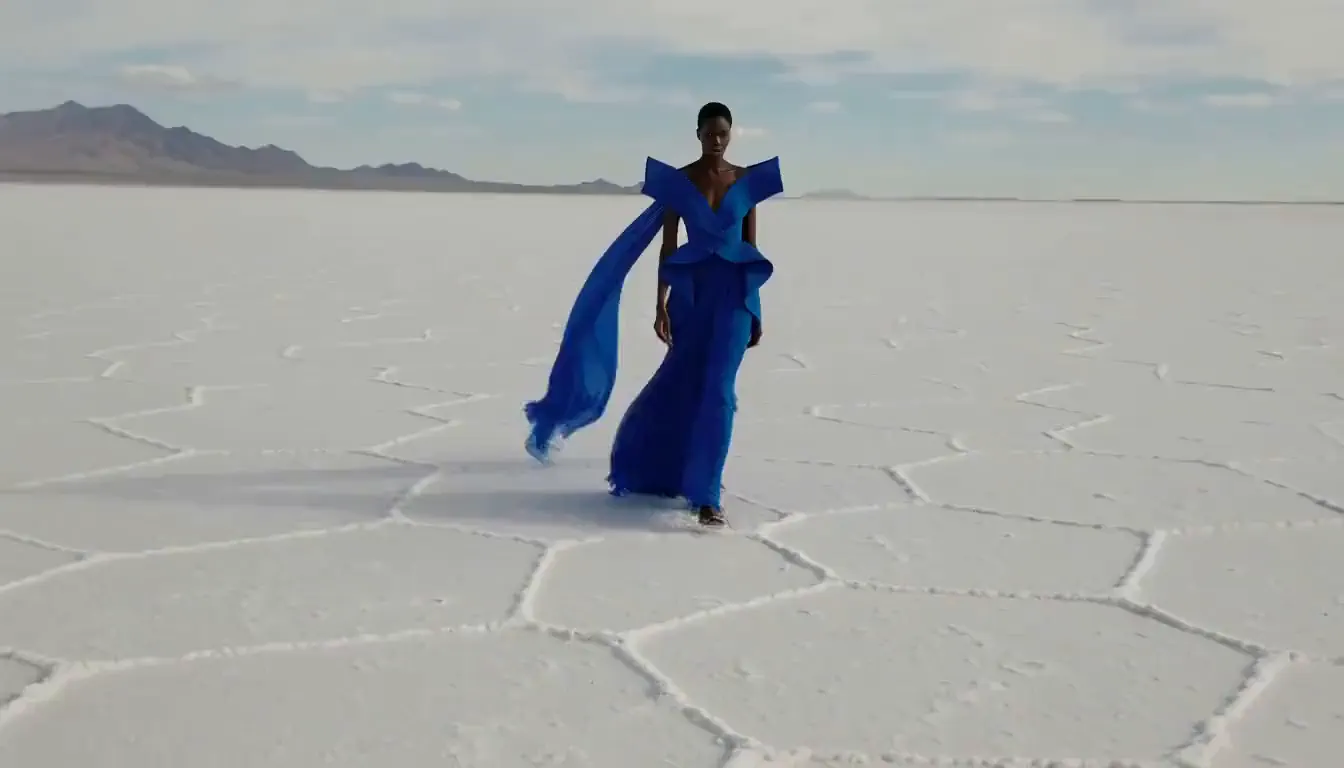
Fashion — cobalt fabric across a white salt flat

A continuous fashion shot coordinates a measured walk, a wide camera arc, wind-driven fabric, and a precise final pose.

Task
Keep one model and a structured gown recognizable while long fabric panels move independently in the wind.
Video settings
Text-to-Video · 10s output · 1344×768 · 24 FPS · 16:9 · AAC audio
Generated
2026-09-17
Task ID
d7992e9dfa7747f0a3a260a3981957cd
Current site equivalent
20 credits at the current 10s / 768P rule
Open video details

What happens: The returned frames keep one model, the cobalt gown, the white salt surface, and the moving translucent fabric readable across the camera move.

Check before use: Review the step count, fabric symmetry, identity continuity, and sound timing during playback before using the clip in a final edit.
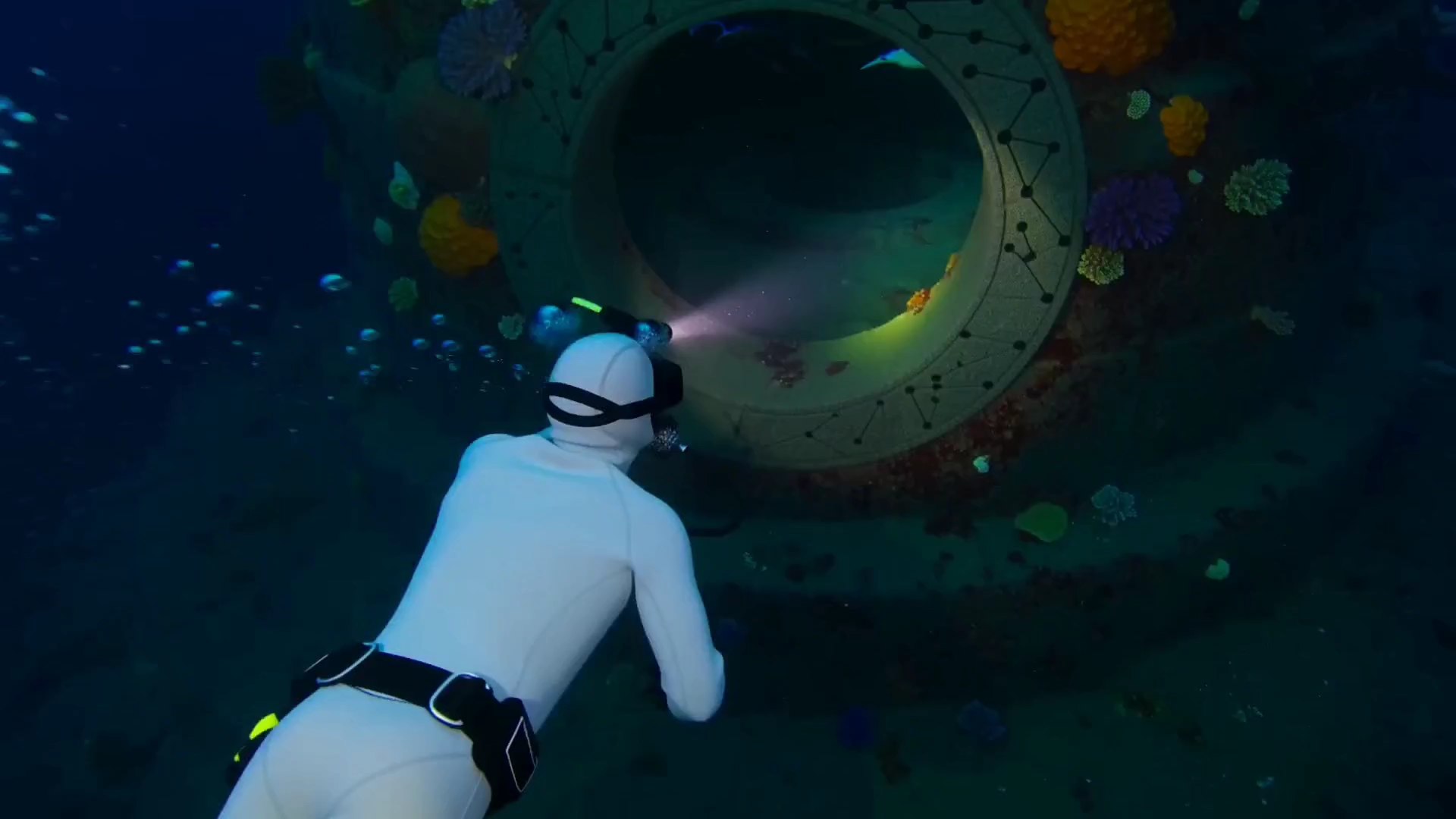

Underwater — a diver enters a luminous observatory

A two-shot exploration brief tests environment continuity, a location change, controlled creature count, and underwater sound design.

Task
Move from an exterior dive to an interior reveal while preserving the diver, doorway, and underwater physics.
Video settings
Text-to-Video · 5s supplied clip · 1920×1080 source · 24 FPS · 16:9 · AAC audio
Generated
Supplied local 1920x1080 video with a 5-second duration.
Task ID
user-supplied-local-asset
Current site equivalent
40 credits at the current 5s / 1080P rule
Open video details

What happens: The result establishes the coral-covered entrance, follows the diver inside, and reveals luminous manta rays around the suspended sphere.

Check before use: Occlusion makes the exact ray count and carved doorway geometry harder to follow, so check both details during playback.

Paper craft — a city unfolds from a travel journal

An overhead stop-motion brief uses an ordered construction sequence, fixed object counts, and tactile paper sound cues.

Task
Build a miniature paper city in a visible order, then send one tram around the completed layout.
Video settings
Text-to-Video · 10s output · 1344×768 · 24 FPS · 16:9 · AAC audio
Generated
2026-09-17
Task ID
0dfcf060c0b14ae08c46bad1fa70e561
Current site equivalent
20 credits at the current 10s / 768P rule
Open video details

What happens: The video progresses from an open journal to a raised miniature town with a circular rail route and moving paper tram.

Check before use: Small printed marks on the surrounding ticket are not stable or meaningful; precise building and tree counts require frame-level checking.

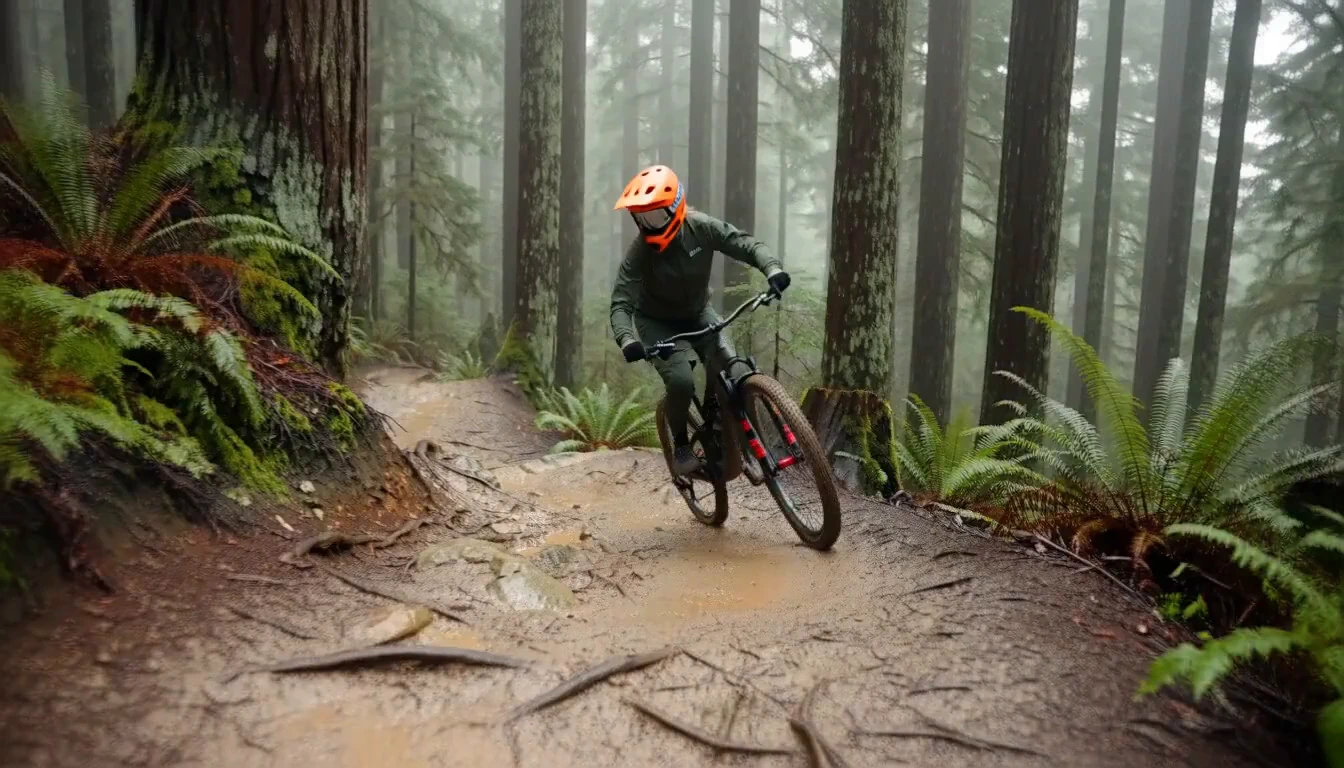
Action sports — a mountain-bike line through redwoods

A fast camera plan separates tracking, cornering, and landing into readable beats while preserving rider and bicycle details.

Task
Follow one rider through a wet berm and a small rock drop with physically believable motion.
Video settings
Text-to-Video · 10s output · 1344×768 · 24 FPS · 16:9 · AAC audio
Generated
2026-09-17
Task ID
8a11ff3f0d824795971e54e009dbdf6d
Current site equivalent
20 credits at the current 10s / 768P rule
Open video details

What happens: The generated sequence keeps the orange helmet and dark bicycle readable across low tracking, forest traversal, and the wider rock approach.

Check before use: Wheel geometry, tire contact, suspension behavior, and the final landing should be inspected at normal speed and frame by frame before production use.

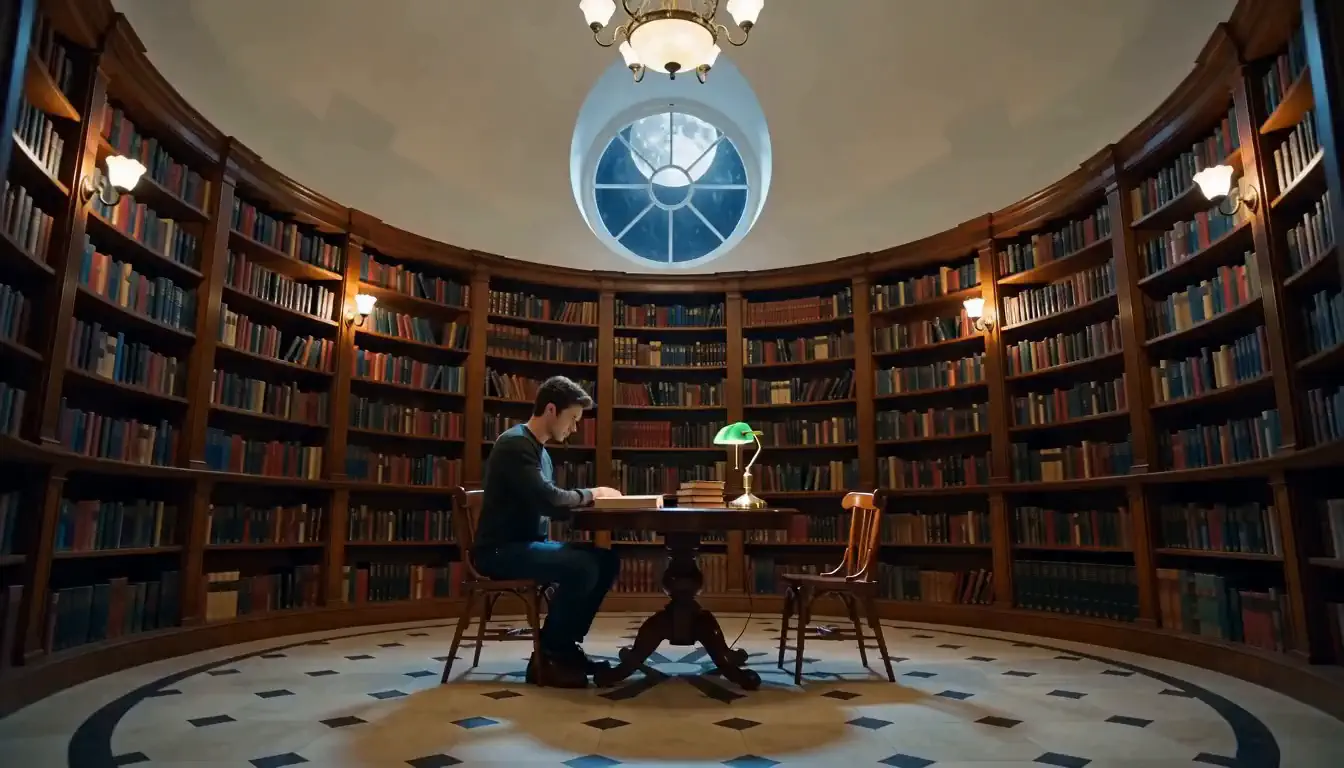
Transformation — a circular library grows into a forest

A single-shot transformation prompt gives roots, plants, trees, canopy, and character reaction an explicit order.

Task
Transform an intact reading room into a moonlit indoor forest without losing its architectural anchors.
Video settings
Text-to-Video · 10s output · 1344×768 · 24 FPS · 16:9 · AAC audio
Generated
2026-09-17
Task ID
ca60bf773cad4e53b9261772d61c921c
Current site equivalent
20 credits at the current 10s / 768P rule
Open video details

What happens: The circular shelves and seated reader remain recognizable while roots, birch trunks, dense foliage, moonlight, and fireflies progressively fill the room.

Check before use: Some shelf and plant boundaries merge during growth; this result demonstrates the transition idea rather than exact architectural preservation.

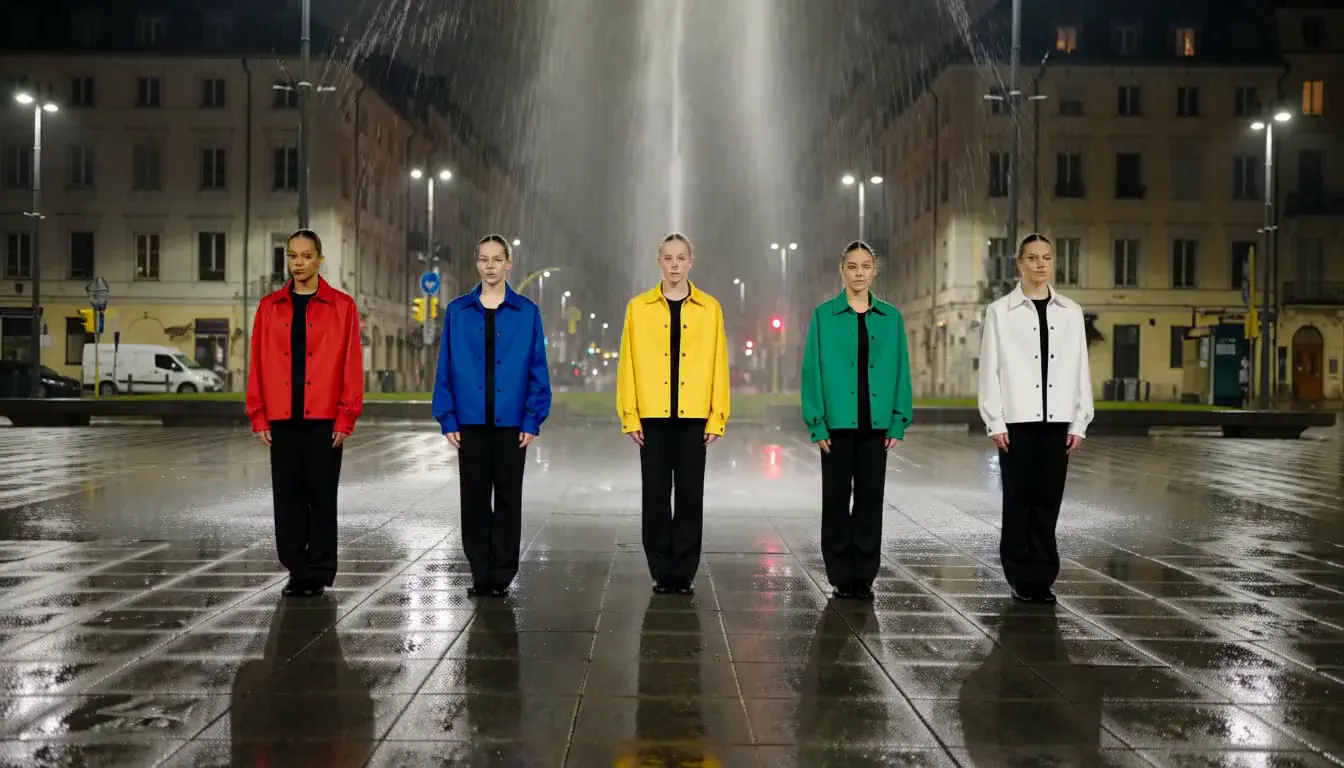
Dance — five-color choreography in a rain-soaked plaza

A group-performance prompt assigns each dancer a color, position, shared sequence, formation change, and final musical cue.

Task
Keep five dancers and their jacket colors distinct while executing synchronized and staggered movements.
Video settings
Text-to-Video · 10s output · 1344×768 · 24 FPS · 16:9 · AAC audio
Generated
2026-09-17
Task ID
21f4daed4d3d4a71adfaddb0df65d82e
Current site equivalent
20 credits at the current 10s / 768P rule
Open video details

What happens: Five dancers in red, blue, yellow, green, and white remain visible as the group moves from a line into a looser final formation on wet stone.

Check before use: Check the choreography, rise order, face continuity, reflections, and beat synchronization during full playback.

See the saved prompts, generation settings, task records, observations, and limitations behind these examples.

Read the MiniMax H3 Max Review

The model behind it

What Is MiniMax H3 Max?

MiniMax created the H3 model family; fal produced the post-trained H3 Max endpoint; h3-max.com provides an independent interface to that hosted endpoint. This site lets you create 5–15 second clips with synchronized audio from text, images, or reference media at 480p, 768p, or 1080p. The endpoint is hosted, its tuned weights are not public, and it does not replace the base MiniMax H3 editing or 2K workflows. Use the full model overview for source history, capability boundaries, and the difference between model, provider, and this website.

Model, provider, and site

Three names describe three different roles: model developer, endpoint provider, and this independent product interface.

This site's output menu includes 480p, 768p, and 1080p. One request stops at 15 seconds.

Picture and stereo audio are generated together for the same short take.

The H3 Max tuned weights are not published for self-hosting.

What Is H3 Max?

Creation formats

What Can You Create with MiniMax H3 Max?

Six kinds of short video people make with H3 Max, and the shape and length that suit each one.

Product videos

One product, one motion: a pour, an unboxing, a rotation, a close-up. Five seconds covers a single action. Use 16:9 for a product page, 9:16 for a feed.

Social clips and hooks

A single visual hook meant to land in the first second: a reveal, a transformation, an impossible camera move. Vertical, 5 to 10 seconds, with ambient sound already attached.

Dialogue and talking-head scenes

One character, one line to camera, with room tone underneath. H3 Max writes the track with the picture, so you check speech timing and expression in the same pass instead of matching a voiceover later.

Stop motion and handmade looks

Clay, paper, fabric, miniatures: anything where stepped motion and visible material texture are the point. H3 Max carries the tactile side in the audio, in small contacts, scrapes, and settles.

Stylized and pixel animation

Game-style scenes, parallax layers, sprite-like characters, and other art directions that need rules rather than realism. Name the visual style explicitly and H3 Max holds it across the clip.

Slow motion and macro

Water, powder, smoke, insects, espresso: subjects that read best slowed down, with the subject sharp against a blurred background.

H3 Max vs MiniMax H3

Key Features of H3 Max

As an AI video generator, H3 Max takes three kinds of input, writes the sound in the same pass as the picture, and lets you control how much it rewrites your prompt. Output specs are in the table below.

Three ways into H3 Max: text to video, image to video, reference to video

Text to video builds the shot from your description alone. Image to video animates a still you upload and follows that image's shape. Reference to video takes images or clips carrying an identity, style, or motion you want repeated.

Limit: Reference mode needs a clear role for each uploaded asset. More references do not automatically mean more control.

Audio arrives in the same pass as the picture

Put the spoken line, room tone, foley, or music direction in the same prompt as the shot. H3 Max returns stereo audio already cut to the picture, so you review motion and sound together.

Limit: If the prompt says nothing about sound, H3 Max infers a track from the scene. Play it before you publish.

Prompt expansion you can turn off

H3 Max can rewrite your prompt into a longer one before generating. Disabled keeps your exact wording, for when you have already written a precise shot brief. Balanced is the default. Quality expands the most, which helps a one-line idea and gets in the way of a careful one.

Limit: Expansion changes the prompt H3 Max actually sees. If a result drifts from what you wrote, set it to Disabled and run again.

A first frame, and an end frame if you want one

For image to video, the first frame sets where the clip begins. An optional end frame sets where it lands, which helps for a loop, a reveal, or an exact transition.

Limit: There is no separate aspect-ratio control here. The clip takes the shape of the source image, so crop it first if you need another.

H3 Max output specs

Resolution480P, 768P, or 1080P on this site. No 2K.
Clip length5, 10, or 15 seconds. Fifteen is the longest single generation; longer needs several clips and an edit.
Aspect ratioSix ratios for text to video. Image and reference modes follow the source.
AudioStereo, generated with the video.
AccessHosted only; weights are not released.
H3 Max Resolution

How to Use MiniMax H3 Max

Write the shot and sound, choose the output settings, generate a first version, then review the motion and audio before downloading.

How to Use MiniMax H3 Max

1. Write the shot and the sound in one block

Name the subject and action, then add camera movement, lighting, dialogue, ambience, or other sound cues. For Image-to-Video and Reference-to-Video, state what each uploaded asset should guide.

2. Pick resolution, length, and shape

Set these in the generator above; the full range is in the H3 Max output specs table.

3. Generate a controlled first version

Use the first result to test the shot plan. Change one important variable at a time so the next version is easier to compare.

4. Review motion and audio together

Unmute the result and review motion, continuity, timing, dialogue, ambience, and unwanted artifacts. Refine the prompt if needed, then download the version that fits the intended placement.

If the first result is wrong, change one layer first

The result adds or changes details

Set Prompt Expansion to Disabled and make the constraint explicit.

The action order drifts

Reduce the number of beats or assign them to clear time ranges.

The image composition changes too much

Crop the source to the final ratio and describe motion, not a new scene.

The audio is wrong or too busy

Name the required sounds and add exclusions such as no music.

Model comparison

H3 Max vs MiniMax H3

Same model family, different delivery constraints. Compare resolution, editing, hosting, and input requirements before choosing a workflow.

Site selectable output

H3 Max
480p, 768p, 1080p
MiniMax H3 (base)
Not available in this site's generator

fal API public options

H3 Max
480P, 768P, 1080P
MiniMax H3 (base)
Check the selected base-model route

Clip length

H3 Max
5–15 seconds
MiniMax H3 (base)
5–15 seconds

Native audio

H3 Max
Yes
MiniMax H3 (base)
Yes

Reference to video

H3 Max
Yes
MiniMax H3 (base)
Yes

Video editing

H3 Max
No
MiniMax H3 (base)
Yes

Open weights

H3 Max
No — hosted only
MiniMax H3 (base)
Yes, downloadable

Where it loses

No 2K. No editing endpoint. No downloadable weights. If any of those three decides your job, use the base model.

Full H3 Max vs MiniMax H3 comparison

H3 Max Pricing and Credit Packs

Site credits are calculated from output duration and resolution. A 10-second clip uses 10 credits at 480P, 20 at 768P, or 80 at 1080P.

Free

Included on sign-up
$0
10 credits included
1 10-second 480P video — 10 credits / $0
1 5-second 768P video — 10 credits / $0
1080P starts at 40 credits for a 5-second video
Email support from our team
Included when you sign up

Enough to test one shot before you buy.

Starter

One-time
$9.9
99 credits included
Up to 9 10-second 480P videos — 10 credits / ~$1.00 each
Up to 4 10-second 768P videos — 20 credits / ~$2.00 each
Up to 1 10-second 1080P video — 80 credits / ~$8.00 each
Email support from our team
One-time purchase

A single small project, start to finish.

Most popular

Basic

One-time
$29.9
370 credits included
Up to 37 10-second 480P videos — 10 credits / ~$0.81 each
Up to 18 10-second 768P videos — 20 credits / ~$1.62 each
Up to 4 10-second 1080P videos — 80 credits / ~$6.46 each
Email support from our team
One-time purchase

Room to try eight variants of an idea and still ship.

Professional

One-time
$99.9
1,665 credits included
Up to 166 10-second 480P videos — 10 credits / ~$0.60 each
Up to 83 10-second 768P videos — 20 credits / ~$1.20 each
Up to 20 10-second 1080P videos — 80 credits / ~$4.80 each
Email support from our team
One-time purchase

Ongoing production across several projects.

This site's standard H3 Max workflow uses 1 credit per second at 480P, 2 at 768P, or 8 at 1080P. Reference inputs can add credits; the generator shows the total before submission. See H3 Max Pricing.

Product information

Sources and Verification

Product specifications link to their source, while the locally saved examples show their available settings and task records separately.

Model origin and fal-published launch measurements

fal — Introducing H3 Max

Base-model family and supported workflow context

MiniMax H3 documentation

Site credits, provider rates, and calculation boundaries

H3 Max pricing methodology

Source hierarchy, corrections, AI assistance, and evidence requirements

Editorial policy

Frequently asked questions

MiniMax H3 Max FAQ

Ten answers covering what H3 Max is, model differences, pricing, output specifications, audio, image and reference inputs, local use, and commercial rights.

What is MiniMax H3 Max?

MiniMax H3 Max is fal's hosted, post-trained version of the MiniMax H3 video model. It creates 5–15 second clips with synchronized audio from text, a starting image, or reference media. h3-max.com is an independent interface to that hosted endpoint, not an official MiniMax or fal website.

Read what MiniMax H3 Max is and where it comes from

What is the difference between MiniMax H3 Max and MiniMax H3?

H3 Max is a hosted, speed-focused post-training of the base MiniMax H3 model. This site offers H3 Max at 480P, 768P, or 1080P. Base MiniMax H3 is the better fit when a project requires its 2K path, published weights, self-hosting, or video-editing workflow.

Compare H3 Max vs MiniMax H3 by delivery requirement

Is MiniMax H3 Max free to use?

The current plan configuration lists a 10-credit signup balance. Eligible accounts can also receive a separate free-generation voucher restricted to 480P and five seconds. The generator shows Free when the voucher applies; otherwise it displays the required credits. Credit packs start at $9.90 with no subscription.

How much does a MiniMax H3 Max video cost?

A 5-second MiniMax H3 Max video uses 5 site credits at 480P, 10 at 768P, or 40 at 1080P. Longer clips multiply that per-second rate. Reference media can add credits, and the generator shows the complete cost before you submit the task.

See H3 Max pricing and reference-input charges

What resolution, duration, FPS, and aspect ratios does H3 Max support?

On h3-max.com, H3 Max supports 480P, 768P, and 1080P output at 24 FPS. Clips can run from 5 to 15 seconds. Text-to-Video supports 21:9, 16:9, 4:3, 1:1, 3:4, and 9:16; image-led modes follow the uploaded source shape.

Check the complete H3 Max resolution and duration guide

Does MiniMax H3 Max generate audio and dialogue with the video?

Yes. H3 Max generates stereo audio in the same pass as the picture. You can describe dialogue, ambience, sound effects, music, or intentional silence in the prompt. Generated wording, lip synchronization, and cue timing can still vary, so review both the soundtrack and the image before publishing.

Can MiniMax H3 Max turn an image into a video with first and last frames?

Yes. Image-to-Video requires a first image and can accept an optional end image. The first frame establishes the opening composition, while the end frame guides where the shot should finish. Describe the movement and camera path between them; the output follows the source image's aspect ratio.

Does MiniMax H3 Max support reference-to-video?

Yes. Reference-to-Video can use reference images, video clips, and audio to guide identity, product appearance, visual style, motion, or sound. Give every uploaded reference a clear role in the prompt. Reference media may add credits, and the generator displays the calculated total before submission.

Is MiniMax H3 Max open source or available for local use?

No. MiniMax H3 Max is hosted only and fal has not released its weights. If you need self-hosting, that is base MiniMax H3, whose weights were published on August 3, 2026 under a license with regional limits.

Can I use MiniMax H3 Max videos commercially?

Yes. Content generated through the fal.ai API can be used in commercial projects, and fal's terms of service carry the full detail. Read them before a paid campaign, particularly around recognisable people and trademarked material.

Try MiniMax H3 Max

Choose Text-to-Video, Image-to-Video, or Reference-to-Video and start creating a short video with synchronized sound.

Text-to-Video, Image-to-Video, and Reference-to-Video are available in the generator above.